

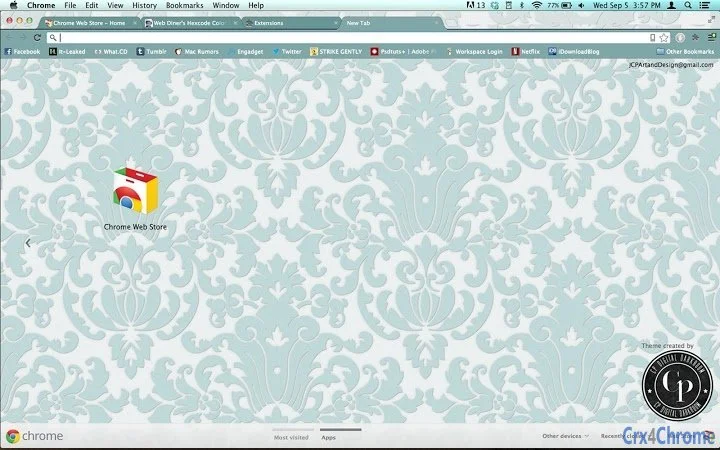
Description
CPDD-Vintage: Minimalistic Vintage Floral Theme
Overview
CPDD-Vintage is a desktop theme designed to enhance the visual experience of Windows and Mac systems with a minimalist aesthetic infused with vintage floral elements. This theme offers a refined, elegant look that transforms the user interface into a soft, artistic environment. Ideal for users who appreciate subtle design details and a nostalgic yet modern feel, CPDD-Vintage caters to individuals seeking a personalized workspace without overwhelming complexity.
The theme addresses the need for personalization in digital environments by providing a cohesive visual style that blends simplicity with artistic flair. It is particularly suited for creative professionals, digital artists, and design enthusiasts who value aesthetics in their daily computing experience. The developer, CP Digital Darkroom, appears to focus on creative digital services, including branding, logo design, and photography, suggesting a strong visual sensibility behind this product.
Real-world usage scenarios include setting up a distraction-free workspace for creative tasks, enhancing the visual appeal of personal or professional devices, or simply refreshing the look of a desktop interface with a unique, handcrafted theme. The theme is intended for users who prioritize visual harmony and mood-enhancing design over functionality-driven tools.
Key Features & Capabilities
- Minimalistic Design – A clean, uncluttered interface that reduces visual noise and supports focused work environments.
- Vintage Floral Aesthetic – Subtle floral patterns inspired by classic design elements, adding warmth and character to the desktop.
- Dark Mode Integration – Designed to complement dark interface settings, enhancing contrast and reducing eye strain.
- Cross-Platform Compatibility – Supports both Windows and Mac operating systems, ensuring consistent visual quality across devices.
- Lightweight Installation – At just 2.5 MB, the theme installs quickly and uses minimal system resources.
These features allow users to create a visually cohesive workspace that reflects personal taste while maintaining system efficiency. For example, a graphic designer might apply the theme to their workstation to align their digital environment with their creative brand identity. Similarly, a writer or student could use it to foster a calm, inspiring atmosphere during long sessions.
User Interface, Workflow & Performance
CPDD-Vintage is a visual theme, not a functional application, so its interface is embedded within the operating system’s desktop environment. Users interact with it through standard system settings, where the theme can be applied with minimal steps. The workflow is straightforward: download, install, and select the theme from the system’s appearance settings.
Navigation is intuitive, relying on familiar OS-level controls. There are no additional menus, toolbars, or configuration panels to manage, which contributes to a seamless user experience. The theme does not introduce new UI elements or modify core system functions, ensuring stability and compatibility with other software.
The developer did not specify resource usage details. Performance observations are based on general software behavior patterns. Given its small size and non-invasive nature, the theme is expected to have negligible impact on system performance, CPU, or RAM usage. Stability is likely high, as it does not include background processes or active components.
Compatibility & System Requirements
CPDD-Vintage is compatible with both Windows and Mac operating systems, as stated in the product details. The theme is designed for desktop environments that support custom themes, including modern versions of Windows and macOS.
The installation size is 2.5 MB, which is compact and suitable for devices with limited storage. The developer did not provide additional system requirements. Exact system requirements were not listed. Compatibility information was partially provided, and users are advised to ensure their system supports theme customization features.
Pros and Cons
Pros
- Minimalist and elegant design enhances visual appeal
- Vintage floral elements add artistic depth without clutter
- Dark mode support improves readability and reduces eye strain
- Lightweight at only 2.5 MB, fast installation
- Available for both Windows and Mac platforms
Cons
- No advanced customization options for individual elements
- Does not include interactive or animated features
- Dependent on OS-level theme support; may not work on all configurations
- Limited to visual changes—no functional enhancements
FAQ Section
Is CPDD-Vintage compatible with all Windows and Mac versions?
The theme is designed for Windows and Mac systems that support custom desktop themes. Specific version compatibility was not provided by the developer.
Is the theme safe to install?
Yes, CPDD-Vintage is a lightweight, non-executable theme file that does not include scripts or active components. It poses no known security risk when downloaded from official sources.
Can I update the theme after installation?
Updates are not specified in the product details. Users should check the developer’s website for any future releases or updates.
Is CPDD-Vintage available for free?
Yes, the theme is available at no cost. No payment is required for download or use.
Does the theme work offline?
Yes, once installed, CPDD-Vintage operates entirely offline. No internet connection is required for the theme to function.
Final Thoughts
CPDD-Vintage delivers a polished, mood-enhancing desktop experience with a thoughtful blend of minimalism and vintage charm. Its elegant floral motifs and dark mode integration make it a standout choice for users who value aesthetic coherence in their digital workspace. While it does not offer functional improvements, its visual refinement serves a meaningful purpose for creative individuals and design-conscious users.
With a lightweight footprint and broad platform support, the theme is accessible and easy to adopt. It stands as a testament to the power of subtle design in shaping user experience. For those seeking a unique, artistic touch for their desktop, CPDD-Vintage is a compelling option.
Download CPDD-Vintage now
Guides & Tutorials for CPDD-Vintage Theme for Chrome
How to install CPDD-Vintage Theme for Chrome
- Click the Preview / Download button above.
- Once redirected, accept the terms and click Install.
- Wait for the CPDD-Vintage Theme for Chrome download to finish on your device.
How to use CPDD-Vintage Theme for Chrome
This software is primarily used for its core features described above. Open the app after installation to explore its capabilities.
User Reviews for CPDD-Vintage Theme for Chrome 0
No reviews found





